MOTOROLA e40 Detailed Specs:

Highlights:
- 4 GB RAM | 64 GB ROM | Expandable Upto 1 TB
- 16.51 cm (6.5 inch) HD+ Display
- 48MP + 2MP + 2MP | 8MP Front Camera
- 5000mAh Battery
- UNISOC T700 Processor
Description:
Specs:


The moto e40 has a 16.51 cm (6.5) Max Vision HD+ Display so that you can enjoy expansive viewing along with a 20:9 aspect ratio. And, with a 90 Hz refresh rate, you can enjoy smooth scrolling and smooth screen usage as well.
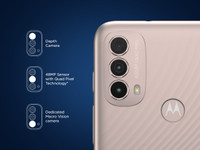
With a 48 MP Triple Camera System with a Depth Sensor and Macro Vision Lens, you can take mesmerising photos no matter the setting or lighting or angle.

Thanks to the custom-designed UNISOC T700 Octa-core 1.8 GHz processor so that you can enjoy a strong graphics performance every time you use the mobile phone.

You can enjoy easy multitasking with the 4 GB of RAM of the mobile phone. Your mobile phone’s performance can be boosted with 64 GB of ROM (that’s expandable up to 1 TB). You can also have enough storage space for all your data.

This mobile phone is equipped with a power-packed 5000 mAh battery so that you can do all that you want with enough battery power. This way, you can play music for up to 76 hours, 14 hours of video streaming, and up to 10 hours of website browsing.

Thanks to the IP52 water-repellant design, you can enjoy using your phone without worrying about spills and splashes. This way, your phone will be protected from the inside and the outside.
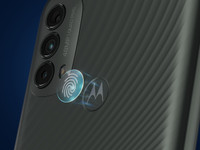
With the fingerprint reader and the face unlock feature, you can enjoy two easy ways of unlocking your phone. Simply touch the fingerprint reader that’s placed beneath the logo for easy unlocking. You can also use the face unlock feature to unlock it with a simple glance.

You can use the dedicated Google Assistant placed on the side of the moto e40 so that you can enable voice control and find the answers that you need. This way, you don’t have to type, tap, or swipe.


0 Comments